
555VU Game Download New Earning Opporunity In 2026
Just Now
7.8MB
1.4.1
Android 5+
26K+

Description
Mobile gaming in Pakistan has experienced massive growth over recent years, with millions of users turning to smartphones for daily entertainment. Among the various digital gaming hubs emerging in the regional market, 555VU Game has gathered notable attention. Designed to consolidate multiple card, table, and arcade-style casual games into a single Android application, 555vu offers a centralized portal tailored for mobile gamers seeking variety, speed, and ease of access.
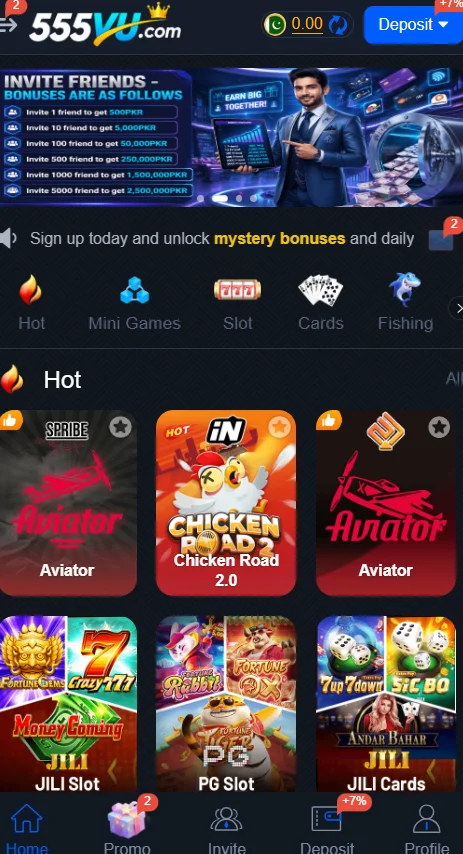
Whether you are looking to explore modern digital card games, test your strategic thinking in multiplayer matches, or simply understand how the application operates on standard devices, having clear, transparent information is essential. This in-depth guide covers every critical aspect of the 555VU Game—including technical features, system requirements, step-by-step installation instructions, account management procedures, security best practices, and local transaction guidelines.
What Is 555VU Game?
555VU Game is an Android-based online gaming portal that provides access to a broad selection of traditional and contemporary casual games. Instead of downloading multiple standalone applications, users can install this single lightweight APK package to unlock an entire library of interactive titles under one digital roof.
The app is built around real-time connectivity, allowing players to compete with others across the country or test their skills in individual modes. Developed with a primary focus on the Pakistani mobile user base, 555VU Game features tailored system settings, optimized server connections for local cellular data networks (3G/4G/5G), and direct integration with popular regional digital payment systems.
Try PK8888 Game for more rewards.
Primary Game Categories Available
Inside the 555VU Game, users generally find a structured classification of games designed to cater to varying interests:
- Classic Card Games: Includes local favorites such as Teen Patti, Rummy, and various regional trick-taking or shedding card titles.
- Table & Board Challenges: Fast-paced board setups including digital Ludo, Carrom, and simplified multiplayer domino variations.
- Casual & Arcade Games: Color-matching games, wheel spins, quick reaction challenges, and target-style arcade titles engineered for quick sessions.
- Strategy & Skill Titles: Predictive and memory-based games that require tactical choices and precise decision-making.
Key Features & Highlights of 555VU Game
To stand out in a competitive ecosystem of mobile entertainment, 555vu app incorporates several performance-focused features engineered specifically for standard Android devices.
User-Friendly Interface and Dashboard Navigation
The visual architecture of 555VU Game emphasizes simplicity. Upon launching the application, users are greeted with a clean home screen where game modes are neatly organized into clear visual tiles. Icons are large and legible, menus use plain terminology, and vital account sections—such as user profile settings, help menus, and transaction logs—are accessible within one or two taps.
Lightweight File Architecture
Modern Android games often require gigabytes of storage space and powerful graphical processors. This game takes the opposite approach by maintaining a small installation package (~7.5 MB). The app assets are compressed effectively, allowing the application to install quickly without filling up internal storage or overwhelming budget device hardware.
Smooth Performance on Entry-Level Devices
The internal codebase is optimized to run efficiently on smartphones with modest hardware profiles (such as 2 GB or 3 GB of RAM). Resource management routines prevent background memory draining, which translates to longer battery life and minimal overheating during extended play sessions.
Tailored Local Payment Gateways
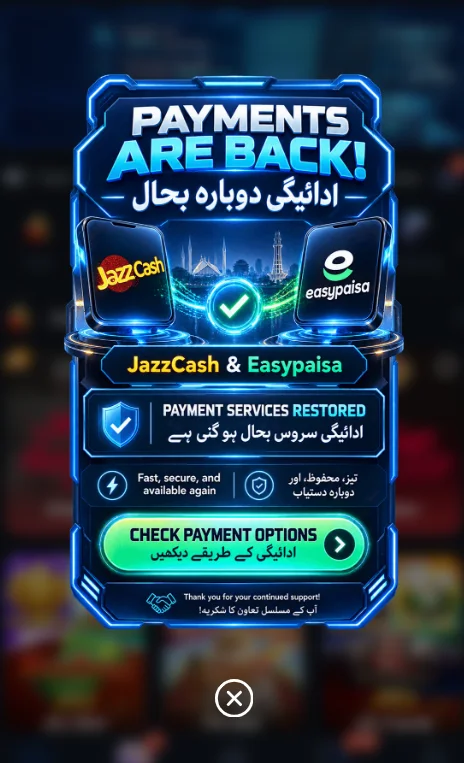
For platforms that feature optional in-app activities or rewards, access to convenient financial transaction methods is crucial. This platform includes built-in setup options for widely used Pakistani mobile wallet platforms, including JazzCash and Easypaisa, alongside standard online banking options.
Multi-Language Accessibility
Recognizing its primary user demographic, the interface features straightforward language choices and intuitive graphic cues, making it easily usable for individuals who prefer simple English or regional visual directions.
Technical Specifications & System Compatibility
Before proceeding with the installation, review the hardware and operating system requirements below to ensure your smartphone is fully compatible with the latest version.
| Feature / Metric | Detailed Specification |
| App Title | 555VU Game APK |
| Category | Online Casual, Card, & Board Gaming |
| Operating System | Android 5.0 (Lollipop) or higher |
| Package File Name | 555vu_Game_v1.1.68.apk |
| Initial Download Size | ~7.5 MB |
| Required Free Storage | Minimum 100 MB (for cache and updates) |
| RAM Requirement | 2 GB minimum (3 GB recommended for best performance) |
| Network Support | Wi-Fi, 3G, 4G LTE, 5G |
| Current Build Version | v1.1.68 (Updated 2026) |
| License Type | Free Download |
555VU Game Detailed Installation Guide for Android
Because third-party gaming applications are frequently distributed outside the traditional Google Play Store via direct package files (APKs), proper setup requires adjusting your device security settings. Follow this detailed sequence to complete the installation safely.
Grant External Installation Permissions
- Unlock your Android device and launch the main Settings app.
- Scroll down and open the Security or Privacy section (on newer Android versions, this may be located under Apps & Notifications > Special App Access).
- Select the option labeled Install Unknown Apps (or Allow Installation from Unknown Sources).
- Locate the web browser (e.g., Google Chrome) or file manager application you intend to use for downloading the package.
- Toggle the switch to On or enable Allow from this source.
Download the 555VU Game Official APK Package
- Open your browser and navigate to the verified, authentic distribution portal for 555VU Game.
- Locate the prominent Download APK button on the home page.
- Tap the button and wait for your browser to complete the file transfer. Ensure that your internet connection remains stable during the download process to avoid corrupted package files.
Locate and Execute the Package Setup
- Open your device’s built-in File Manager or Files app.
- Navigate to your internal storage Downloads directory.
- Tap on the downloaded 555vu_Game_v1.1.68.apk file.
- Review the system prompt and permission list displayed on screen.
- Click Install at the bottom right corner of the installer dialog.
- Once the message “App Installed” appears, tap Open to launch the platform immediately, or click Done to return to your home screen.
555VU Game Registration & Account Creation Workflow
To access multiplayer lobbies, track your gaming history, or participate in account-based activities, setting up a personalized user profile is mandatory. Follow this simple registration procedure to establish your account securely.
Account Registration Steps
- Launch the Application: Open this game from your home screen or app launcher menu.
- Select Account Registration: On the main splash screen, locate and tap the Register or Sign Up button.
- Provide Contact Information: Enter your active local mobile number (e.g., 03XXXXXXXXX) or a valid personal email address. Using an active contact number is critical for receiving operational verification codes.
- Set Up a Secure Password: Create a unique password containing a mix of letters, numbers, and symbols. Avoid predictable sequences such as simple numbers or names.
- Verify Ownership (OTP): Tap Send Code to request an operational One-Time Password via SMS or email. Retrieve the numeric code and type it into the verification input field within the allocated time window.
- Finalize Setup: Read through the basic end-user agreement, check the box to confirm your compliance, and press Confirm / Register to complete setup and unlock your personal lobby.
Logging In to an Existing Profile
If you reinstall the application or switch devices, accessing your saved progress is simple:
- Tap Login on the main menu screen.
- Enter your registered mobile number/email address alongside your established password.
- Tap Submit to load your profile dashboard.
- Note: If you forget your credentials, use the built-in Forgot Password recovery tool on the login screen to reset access via SMS or email confirmation.
555VU Game Deposits & Withdrawals Process
For players exploring optional features inside the 555VU Game ecosystem, understanding how local payment methods interact with the platform is vital. Always approach financial management with caution, awareness, and thorough verification.
Guidance for Depositing Funds
When adding funds or activating optional features within the app:
- Use Direct Official Channels: Only conduct transaction requests through the internal Shop / Wallet menu inside the authentic app. Never transfer money to external third-party accounts provided over personal messaging apps like WhatsApp or Telegram.
- Verify Account Names: Before approving any payment through JazzCash or Easypaisa prompts, double-check that the recipient title on your screen matches the platform’s official merchant name.
- Start Small: If you decide to test payment features, begin with minimal transaction amounts to confirm that the system functions correctly on your specific network.
- Keep Confirmation Logs: Take screenshots of transaction IDs, SMS receipts, and approval notifications for future reference in case processing delays occur.
Guidelines for Payouts and Withdrawals
When requesting balance payouts or transferring rewards back to your mobile account:
- Verify Identity Profiles: Ensure that your profile credentials (name and phone number) align with your active JazzCash, Easypaisa, or bank account registration details. Misaligned details may lead to automated transaction holds.
- Check Payout Thresholds: Review minimum and maximum transfer limits established by the platform before initiating a cash-out request.
- Monitor Processing Windows: While digital wallet transfers are frequently processed quickly, server congestion or system maintenance can result in processing windows extending from a few minutes up to 24 hours.
- Contact Customer Support directly: If a withdrawal remains pending beyond the stated window, contact official support from inside the app with your transaction ID ready.
Advantages & Potential Limitations
A well-rounded understanding of any application requires examining both its strong points and potential limitations. Here is an overview of what users can expect from 555VU Game:
Potential Advantages
- All-in-One Variety: Access dozens of different casual, strategy, and card games without filling up your storage space with separate software downloads.
- Optimized for Local Networks: Performs well across standard Pakistani 3G/4G connections without frequent unexpected drop-offs.
- Tailored Wallet Support: Simplifies payments by utilizing locally available methods such as JazzCash and Easypaisa instead of requiring international credit cards.
- Low System Overhead: Runs smoothly on low-spec Android devices without high battery consumption or excessive background heat.
- Regular Version Updates: Developers routinely release minor bug fixes and optimizations to enhance table performance and stability.
Potential Limitations
- Manual Side-Loading Needed: Not available directly through traditional app stores; requires manually adjusting security permissions to install APK files.
- Constant Internet Connection Required: Offline play is unavailable; a steady data or Wi-Fi connection is necessary for live server syncing.
- Requires Device Security Awareness: Users must ensure they only download the setup package from genuine sources to avoid modified or unsafe files.
- Risk of Financial Mismanagement: As with any real-time platform involving optional transactions, users must manage their activity carefully to avoid overspending.
Important Security Rules & Device Protection
Prioritizing your security, device health, and privacy is crucial when installing application packages obtained outside Google Play. Adhere to these fundamental rules:
- Rely Only on Verified Sources: Download the 555VU Game installer exclusively from authentic, verified websites. Never open or install package files sent via random social media channels, suspicious email attachments, or unverified link-sharing portals.
- Review Requested Permissions: Pay close attention to what permissions the app requests during setup. Standard casual games require network access and storage read/write capabilities for updates. If an app requests unnecessary access to your private contacts, call logs, or SMS messages, halt the installation immediately.
- Secure Your Account Credentials: Use a unique password that you do not share across other services. Never share your login credentials, OTP codes, or transaction pins with anyone—including individuals claiming to represent customer service.
- Maintain Device Upgrades: Keep your Android operating system and mobile security software updated to protect against vulnerabilities.
Final Thoughts
555VU Game offers a compact, accessible option for mobile gamers across Pakistan who enjoy having quick access to card titles, table challenges, and casual arcade games in one app. Its light footprint, smooth performance on budget smartphones, and support for regional mobile wallets make it an appealing choice for daily casual entertainment.
To ensure a safe and positive experience, always download the setup package from verified sources, safeguard your login details, and treat online gaming purely as a leisure activity. By following the security instructions and setup guidelines in this review, you can install the application securely and enjoy smooth, uninterrupted gameplay on your Android device.
Frequently Asked Questions
What is 555VU Game?
555VU Game is a popular Android mobile entertainment portal that offers access to a variety of casual, card, table, and arcade-style mini-games within a single, lightweight application.
Is 555VU Game completely free to download?
Yes, downloading the installer package and registering a basic account carries no cost. Players can explore the platform menu without paying mandatory entry fees.
How do I resolve installation errors on my phone?
If the installation fails, ensure that your device has at least 100 MB of free storage space, confirm that your Android version is 5.0 or higher, and verify that the Install Unknown Apps setting is turned on for your browser or file manager.
Download links
How to install 555VU Game Download New Earning Opporunity In 2026 APK?
1. Tap the downloaded 555VU Game Download New Earning Opporunity In 2026 APK file.
2. Touch install.
3. Follow the steps on the screen.